# Alert rules
Create an alert rule in Maple: pick a signal, scope it to services and environments, set the threshold and evaluation timing, attach destinations, and preview it against past data. In the app or over the API.
An **alert rule** watches one signal, checks it against a threshold every minute, and opens an [incident](/docs/alerting/incidents) when the threshold is crossed for long enough. Each incident notifies the [destinations](/docs/alerting/notification-destinations) attached to the rule.
You manage rules on the **Alerts** page. Creating, editing and deleting rules requires the organization admin role.
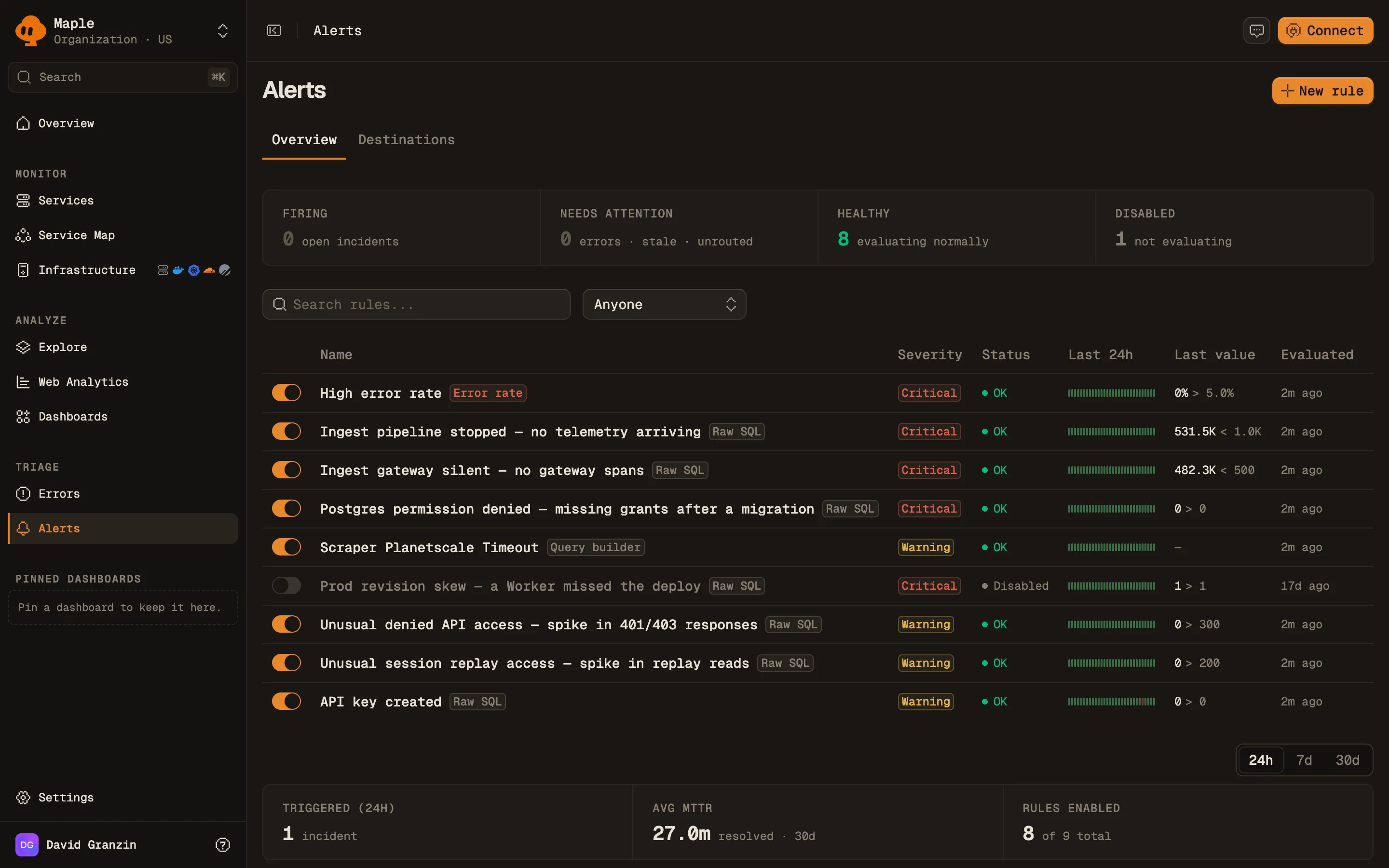
The Alerts overview. The strip in each row shows the last 24 hours of checks.
## Prerequisites
- Telemetry arriving in Maple. Built-in signals read traces.
- At least one [notification destination](/docs/alerting/notification-destinations). A rule cannot be saved without one.
## Create a rule
1. Open **Alerts** and click **New rule**. To start from a service, open the service and click **Create Alert**, which fills in the scope.
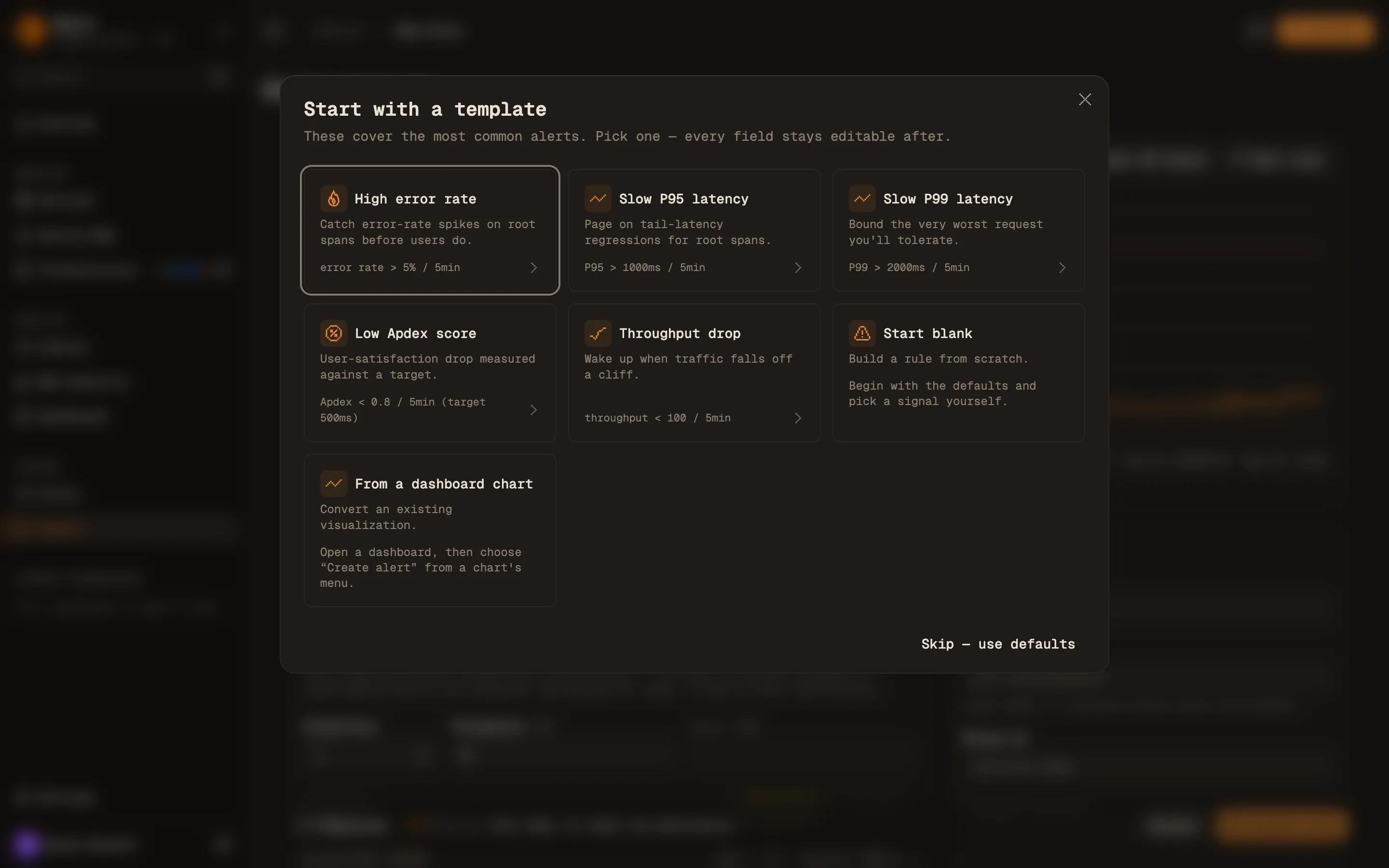
2. **Start with a template** opens first. Pick a template, **Start blank**, or **From a dashboard chart**. Every field a template sets stays editable.
3. Fill in **Signal & threshold**, **Scope**, **Notifications** and **Details**, described below.
4. Click **Test rule** to preview the rule against past data.
5. Click **Create rule**.
The template picker that opens when you create a rule.
The templates:
| Template | Signal | Fires when | Window | Also sets |
| ---------------- | ---------- | ------------------- | ------ | ------------------------------------------------ |
| High error rate | Error rate | above 5% | 5 min | **Group by** `service.name` when no scope is set |
| Slow P95 latency | P95 | above 1000 ms | 5 min | |
| Slow P99 latency | P99 | above 2000 ms | 5 min | |
| Low Apdex score | Apdex | below 0.8 (T 500ms) | 5 min | |
| Throughput drop | Throughput | below 100 | 5 min | **Min samples** 0 |
## Signals
The signal kind is **Built-in**, **Query** or **Raw SQL**.
**Built-in** signals read the entry-point spans of each service: server and consumer spans, and trace roots. That is the same set of requests the service pages chart.
| Signal | API `signal_type` | Value compared against the threshold |
| ---------- | ----------------- | ------------------------------------------------------------------------------------------------------------ |
| Error rate | `error_rate` | Share of requests with status `Error`. Entered as a percent in the app, a 0 to 1 ratio in the API. |
| P95 | `p95_latency` | 95th percentile duration, in milliseconds. |
| P99 | `p99_latency` | 99th percentile duration, in milliseconds. |
| Apdex | `apdex` | Apdex score from 0 to 1, against the **Apdex target (ms)**. See [Apdex alerts](/docs/alerting/apdex-alerts). |
| Throughput | `throughput` | Estimated number of requests in the window. |
Counts and rates are weighted for sampling. See [Sampling and throughput](/docs/concepts/sampling-throughput).
A built-in signal only sees entry-point spans. A service that records a failure on a child span and still returns success from its entry point stays healthy on these signals. Use a **Query** or **Raw SQL** rule for that case.
**Query** (`builder_query`) uses the same query builder as dashboard charts. It can read traces, logs, metrics or product events, with its own filters and group-by. The quickest way to build one is from a chart: open a dashboard, open the chart's menu and choose **Create alert**.
**Raw SQL** (`raw_query`) runs your own SQL. The query must include `$__orgFilter` and a `$__timeFilter(...)` on the time column, and return a time bucket and a value. **Reduce buckets by** turns the buckets in the window into one value: **Last bucket**, **Sum**, **Average**, **Minimum** or **Maximum**. To evaluate several groups, return a group column. Return a `samples` column with the number of events behind each row: **Min samples** sums it, and without it every row counts as one sample, so the minimum counts buckets rather than events. See the [SQL reference](/docs/reference/sql).
For **Query** and **Raw SQL** rules the query carries its own filters, so the **Scope** section is hidden.
## Threshold
**Condition** is one of `>`, `>=`, `<`, `<=`, `=`, `!=`, `between` or `not between`. The range conditions use **Lower** and **Upper**. **Threshold** is the value the signal is compared against.
**Severity** is **Warning** or **Critical**. It is shown on the incident and in every notification.
## Scope
Scope applies to built-in signals.
- **Services.** Empty means every service. When you pick more than one service, Maple evaluates each service on its own and opens a separate incident per service.
- **Environments.** Empty means every environment. Otherwise the rule only counts spans from the listed deployment environments (`deployment.environment.name`).
- **Group by.** With no services selected, a group-by such as `service.name` or an attribute like `attr.http.route` evaluates each group on its own. You get one incident per group that breaches, instead of one blended value that may never cross the threshold.
- **Exclude services.** Skips named services. It needs **Group by** set to `service.name` and no services selected.
## Evaluation timing
Maple checks every enabled rule on its check interval. Each check aggregates the last **Window (min)** minutes, so a 5-minute window checked every minute is a rolling 5 minutes re-scored every 60 seconds. See [Check interval and query limits](#check-interval-and-query-limits).
**Evaluation timing** is collapsed to a summary line (for example `5min · 2× · renotify 30min`) until you open it:
| Field | App default | API field | API default | What it does |
| ------------------ | ----------- | ------------------------------- | ----------- | ------------------------------------------------------------------- |
| Window (min) | 5 | `window_minutes` | required | Length of the window each check aggregates. 1 to 1440 minutes. |
| Breaches to fire | 2 | `consecutive_breaches_required` | 2 | Consecutive breaching checks before an incident opens. |
| Healthy to resolve | 2 | `consecutive_healthy_required` | 2 | Consecutive healthy checks before an incident resolves. |
| Min samples | 50 | `minimum_sample_count` | 0 | A check with fewer samples than this is skipped. |
| Renotify (min) | 30 | `renotify_interval_minutes` | 30 | How often an open incident notifies again while it keeps breaching. |
A skipped check counts neither as a breach nor as healthy. It leaves the breach and healthy counters where they were.
A window with no data at all is skipped, with two exceptions: a rule with **Alert when there is no data** on (`alert_on_no_data`) counts it as a breach, and otherwise a **Throughput** rule with `<` or `<=` treats it as zero. Turn the switch on for **Raw SQL** rules, where a query that stops matching otherwise goes quiet instead of firing. It is not available on grouped rules: a group that stops reporting keeps its open incident until its telemetry returns. On a **Raw SQL** rule that returns a group column, it fires only when the query returns no rows at all.
The **Min samples** check runs before the threshold comparison, and that zero still counts as zero samples. For **Throughput** the sample count is the signal, so a drop rule with the blank form's default of 50 skips every window below 50 requests, including a full outage, and cannot fire for those windows. Set **Min samples** to 0 for throughput drop rules, as the **Throughput drop** template does. Then traffic stopping entirely fires the rule.
Short windows on low-traffic services are noisy, because a few slow or failed requests move the value a long way. Raise **Min samples** or widen the window for those services.
## Check interval and query limits
**Check every** in the rule editor (`evaluation_interval_minutes` in the API) sets how often a rule is checked: every 1, 5, 10, 15, 30 or 60 minutes. Leave it on **Auto** and Maple derives it from the window: a fifth of the window, between 1 and 5 minutes. The window must be at least as long as the interval, so no data falls between two checks.
A **Raw SQL** rule's query gets more time when the rule is checked less often:
| Check interval | Query time limit |
| ------------------ | ---------------- |
| Under 5 minutes | 5 seconds |
| 5 minutes | 15 seconds |
| 10 minutes or more | 25 seconds |
The editor times one check of a **Raw SQL** rule as you write it and shows **Query time** against the limit of the picked interval. When the query is too slow for that interval, it offers the shortest interval it fits and blocks saving until you pick one or make the query cheaper; when the query is close to its limit it suggests cheaper filters, such as a service filter. The same timing comes back as `query_timing` from `POST /v2/alerts/rules/preview` and in the `preview_alert_rule` MCP tool.
When a rule's query hits its time or memory limit 3 checks in a row, Maple slows the rule down to the next interval that raises that limit, never past the window. The rule shows when it was slowed down and which interval it runs at. Editing the rule resets the slowdown, so make the query cheaper or pick a longer interval first.
## Notifications
Pick one or more destinations in **Notifications**. **Send test** delivers a test notification for this rule to the selected destinations.
**Message template** customizes the title and Markdown body of Slack, Discord, Telegram and PagerDuty notifications with `{{ variable }}` substitution, for example `{{ rule.name }}`, `{{ value }}` or `{{ links.app }}`. Leave it blank for the built-in format. Email, webhook and Hazel destinations always use the built-in format.
## Details
**Rule name** is required. **Tags** (up to 20, each up to 32 characters) group and filter rules and incidents on the Alerts page. **Notes** are free text shown with the rule.
## Preview a rule
The chart at the top of the form replays the rule over a past time range. Pick the range and click **Test rule**. The chart shows the value for each window, the threshold, and shaded spans where the rule would have held an incident open. The badge reads **Would trigger** or **Within threshold** for the latest window.
The preview sends nothing. Use it to check that a threshold would not have fired all week, or would have caught last Tuesday's incident.
## Create a rule over the API
Rules are available at `/v2/alerts/rules` on `https://api.maple.dev` (`https://api.eu.maple.dev` for EU organizations). Use an API key (`maple_ak_…`) from **Settings → Keys**. Creating, updating, deleting and testing a rule requires the `alerts:write` scope and the org admin role.
```bash
curl -X POST https://api.maple.dev/v2/alerts/rules \
-H "Authorization: Bearer maple_ak_…" \
-H "Content-Type: application/json" \
-d '{
"name": "Checkout error rate",
"signal_type": "error_rate",
"comparator": "gt",
"threshold": 0.05,
"window_minutes": 5,
"service_names": ["checkout"],
"environments": ["production"],
"severity": "critical",
"minimum_sample_count": 50,
"destination_ids": ["dest_oybbpTBhtSFGShMjjLiCrh"]
}'
```
Error rate thresholds are 0 to 1 ratios in the API (`0.05` is 5%). `destination_ids` must name at least one existing destination.
To preview a rule over a past range, `POST /v2/alerts/rules/preview` with the rule under `rule` and the range in `start_time` and `end_time`. It needs the `alerts:read` scope and sends nothing.
```bash
curl -X POST https://api.maple.dev/v2/alerts/rules/preview \
-H "Authorization: Bearer maple_ak_…" \
-H "Content-Type: application/json" \
-d '{
"rule": {
"name": "Checkout error rate",
"signal_type": "error_rate",
"comparator": "gt",
"threshold": 0.05,
"window_minutes": 5,
"service_names": ["checkout"],
"severity": "critical",
"destination_ids": ["dest_oybbpTBhtSFGShMjjLiCrh"]
},
"start_time": "2026-07-14T00:00:00.000Z",
"end_time": "2026-07-15T00:00:00.000Z"
}'
```
The response lists the value and status of each window per group in `series`, and the spans where an incident would have been open in `would_fire`.
`POST /v2/alerts/rules/test` evaluates a rule once against current data. Set `send_notification` to `true` to also deliver a test notification. See the [API reference](/docs/reference/api) for every endpoint and field.
## Troubleshooting
- **The rule never fires.** Open the rule and look at its checks. If every check is skipped, each one says why: **no data** means the scope or query matches nothing, **below min samples** means the window has fewer samples than **Min samples**. Check the service names and environments against what is arriving.
- **The rule fires and resolves over and over.** Raise **Breaches to fire** and **Healthy to resolve**, or widen the window.
- **Save is disabled.** The action bar lists what is missing, such as a rule name or a destination.
## Next steps
- [Incidents](/docs/alerting/incidents): what happens after a rule fires.
- [Apdex alerts](/docs/alerting/apdex-alerts): choosing the target and threshold for an Apdex rule.
- [Uptime monitoring](/docs/alerting/uptime-monitoring): availability alerts from traces, and HTTP checks from the OpenTelemetry Collector.
- [Notification destinations](/docs/alerting/notification-destinations): where notifications go.